eBay clothing photos: add a worn shot of the real piece
eBay buyers cannot touch the item, so they study the photos. Next to your real shots, a worn photo of the same piece answers the question flat photos leave open: how does it fit?
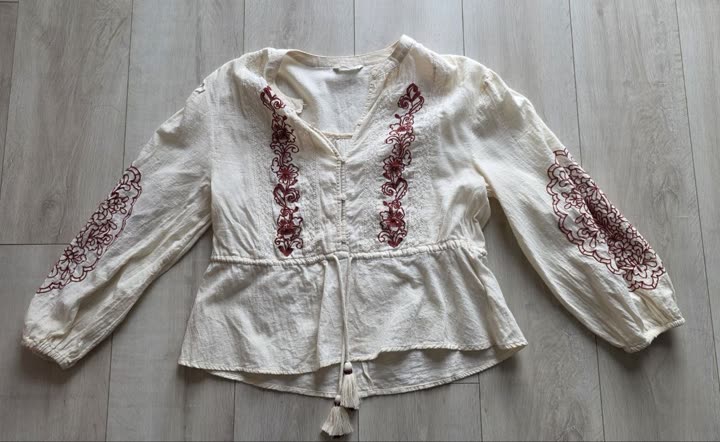
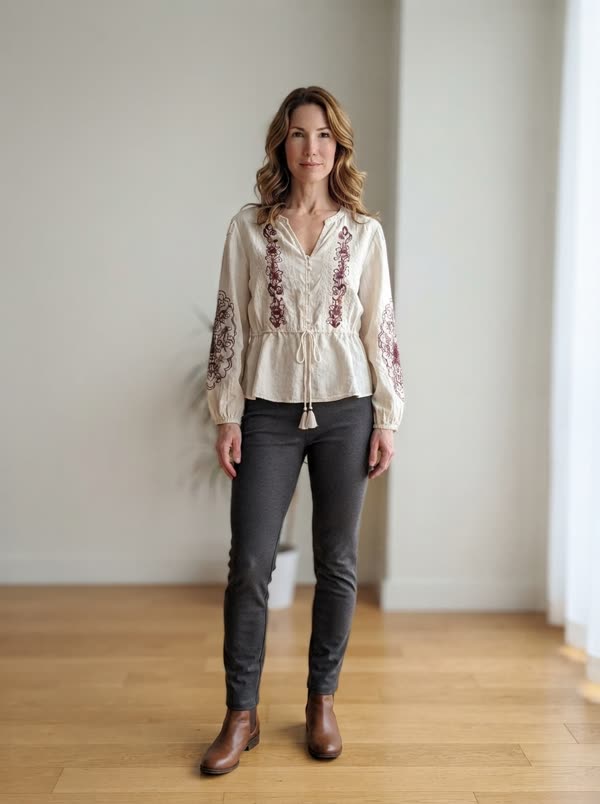
From a flat lay to a worn photo
- Create your free account and add the piece you are selling: one phone photo, laid flat, on a hanger or on the bed. The background is removed for you.
- Open the piece and tap "worn photo". The first time, pick who wears it: women's and men's models, several skin tones and ages.
- About 20 seconds later the photo is ready: your garment worn by the model, its color, print and cut kept, with plain basics around it so it stays the focus.
- Download it (no watermark) and add it to your eBay listing, after your real photos.
What eBay clothing buyers want to see
- The actual item. For used clothes, buyers expect photos of the piece they will receive, not a catalog image.
- Every angle: front, back, the size label, the care label and the brand tag.
- A flat shot that makes measurements easy to picture, so the length and the chest width are clear.
- Flaws up close. A pulled thread shown honestly prevents a return later.
- A clean frame: plain background, daylight, and no text or borders added on top of the photo.
Why add a worn photo on eBay
Flat photos say what the item is. A worn photo shows how it hangs on a body: where the hem falls, how loose the sleeve is, how a coat sits on the shoulders. For dresses, coats and wide pants, that is often what decides the click.
Put it after your real photos and say in the description that it is an AI preview of the item worn. Your real photos prove the condition, the worn photo shows the shape.
Good to know
- The model and the room are generated. The garment comes from your photo.
- Plain basics are added around your piece, like a white tee under a jacket or simple pants with a top, so it stays the focus.
- The photo has no watermark, so it uploads like any other picture.
- Our guide to photos without a model compares hanger, flat lay and worn photos side by side.
What it costs
Your first worn photo is free, whatever your plan. After that, photos come in packs: 5 for €2.99 or 15 for €6.99. You pay once, there is no subscription, and unused credits never expire. A credit is only used when the photo is delivered.
Questions
Is an AI worn photo allowed on eBay?
eBay asks sellers to show the actual item, so keep real photos of your piece first and use the worn photo as an extra, labeled in the description. Check eBay's current photo policy for your category before you list.
Which items gain the most from a worn photo?
Pieces where fit matters: dresses, coats, jackets, knitwear, jeans and pants. A plain white tee gains less from it than a wrap dress.
Can I make photos for several items?
Yes, one at a time. Each worn photo is made from the page of one piece, so add your items once and make a photo for each one you list.
Is the eBay photo generator free?
Your first worn photo is free on any plan, no subscription needed. After that, 5 photos cost €2.99 and 15 cost €6.99, paid once, and the credits never expire.
Your next listing deserves a worn photo.
Try it on one pieceOutfitMaker is an independent wardrobe app. It is not affiliated with, endorsed by or sponsored by eBay. eBay is a trademark of its owner.