Mercari photo generator: let buyers see the fit
Mercari listings move fast, and the first photos decide whether anyone taps. A worn photo of your own piece helps clothes stand out next to items shot on the floor.
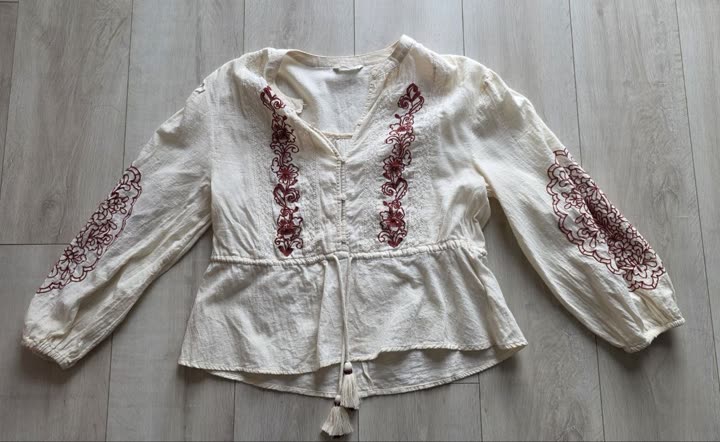
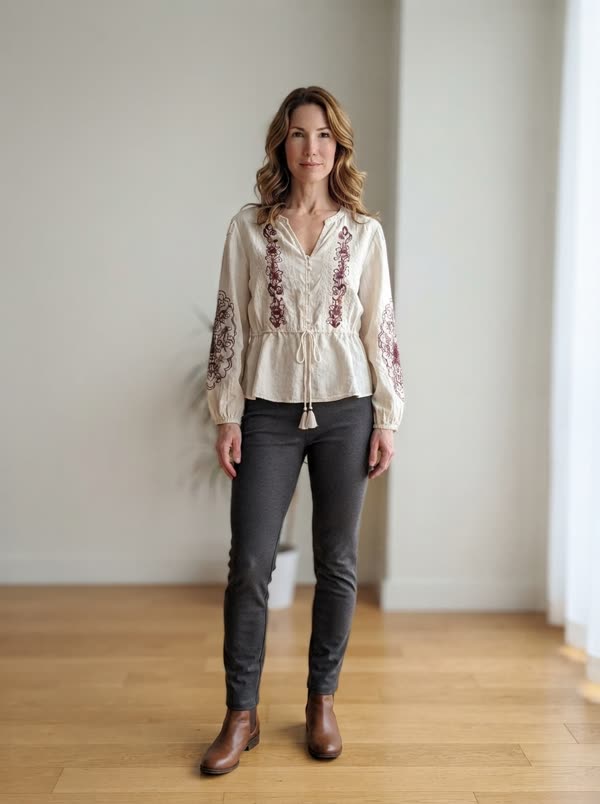
From a flat lay to a worn photo
- Create your free account and add the piece you are selling: one phone photo, laid flat, on a hanger or on the bed. The background is removed for you.
- Open the piece and tap "worn photo". The first time, pick who wears it: women's and men's models, several skin tones and ages.
- About 20 seconds later the photo is ready: your garment worn by the model, its color, print and cut kept, with plain basics around it so it stays the focus.
- Download it (no watermark) and add it to your Mercari listing, after your real photos.
What sells clothes on Mercari
- A clear first photo: one piece, centered, with nothing else in the frame. The feed shows small square thumbnails.
- Daylight near a window, so the color matches what arrives.
- Tags and labels: brand, size and material, which also help you fill in the listing.
- Wear shown up close: pilling, fading, a missing button. Honest photos mean fewer problems after delivery.
Add a worn photo in about 20 seconds
Most people listing clothes photograph them flat or on a hanger because there is nobody to model them. That shows the item, but not the fit. OutfitMaker turns that same photo into a photo of the piece worn by a model, so buyers can picture it on.
Add it after your real photos and mention that it is an AI preview of the item worn. For the photos you take yourself, our guide to photos without a model shows what works best.
What it costs
Your first worn photo is free, whatever your plan. After that, photos come in packs: 5 for €2.99 or 15 for €6.99. You pay once, there is no subscription, and unused credits never expire. A credit is only used when the photo is delivered.
Questions
Can I use the photo I already took?
Yes. Any phone photo of the garment works: on the floor, the bed or a hanger. Add it as a piece and make the worn photo from it.
What does the worn photo look like?
A portrait photo of a model in a bright, plain room, wearing your piece with simple basics, with no text and no watermark.
Do I need a subscription?
No. Worn photos work with one time credits, and the first one is free.
Is the Mercari photo generator free?
Your first worn photo is free on any plan, no subscription needed. After that, 5 photos cost €2.99 and 15 cost €6.99, paid once, and the credits never expire.
Your next listing deserves a worn photo.
Try it on one pieceOutfitMaker is an independent wardrobe app. It is not affiliated with, endorsed by or sponsored by Mercari. Mercari is a trademark of its owner.