Depop photo generator: show your piece worn, without a model
On Depop, the photos do the selling. If nobody is around to model your pieces, OutfitMaker turns a simple photo of the garment into a worn shot of that same piece in about 20 seconds.
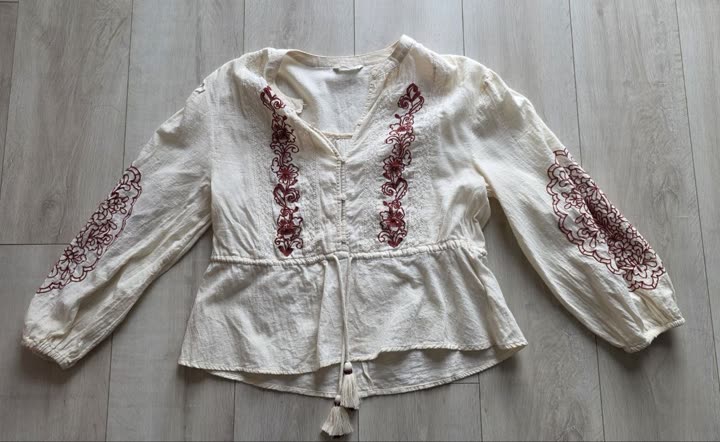
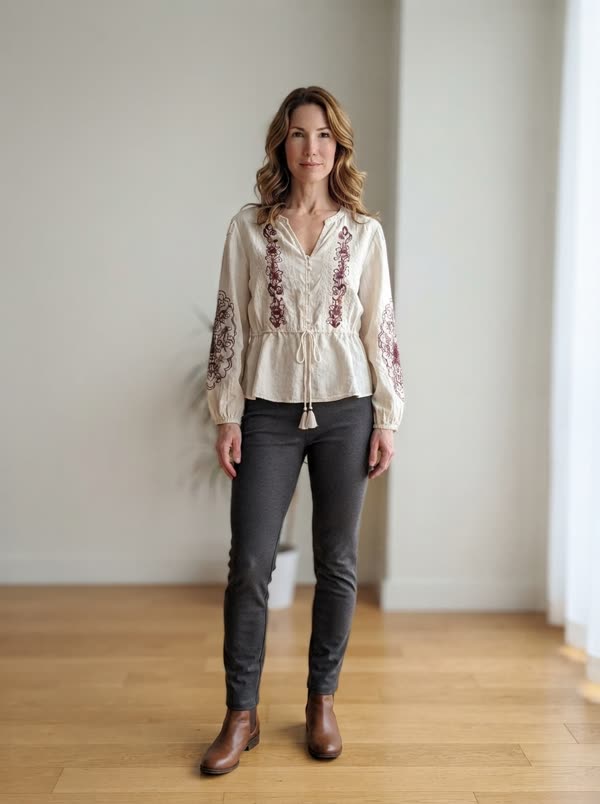
From a flat lay to a worn photo
- Create your free account and add the piece you are selling: one phone photo, laid flat, on a hanger or on the bed. The background is removed for you.
- Open the piece and tap "worn photo". The first time, pick who wears it: women's and men's models, several skin tones and ages.
- About 20 seconds later the photo is ready: your garment worn by the model, its color, print and cut kept, with plain basics around it so it stays the focus.
- Download it (no watermark) and add it to your Depop listing, after your real photos.
What Depop buyers look for in photos
- How it looks on a person. Depop grew up on styled, worn photos, so a piece lying on a duvet tends to look like an afterthought next to them.
- A square crop that still works. Shops and search show square thumbnails, so keep the whole piece centered with some room around it.
- The real details: the label, the fabric up close, the true shade, and any flaw, photographed honestly.
- A setting that suits the piece. A plain wall or floor lets a vintage jacket or a printed tee carry the photo on its own.
Where the worn photo goes in your listing
Start with your own photos of the real item: front, back, label and close ups of anything a buyer should know about. Then add the worn photo so people can picture the fit and the length.
It is an AI image of your real piece, so say so in the description, for example "photo 3: AI preview of this item worn". Buyers trust sellers who are upfront, and nobody can question the condition when your real photos come first.
Check the photo against the garment before you post it. The AI is told to keep the color, print, cut and any visible wear exactly as they are, but you know your piece best. For more photo basics, our guide to Vinted photos that actually sell works just as well on Depop.
What it costs
Your first worn photo is free, whatever your plan. After that, photos come in packs: 5 for €2.99 or 15 for €6.99. You pay once, there is no subscription, and unused credits never expire. A credit is only used when the photo is delivered.
Questions
Can I use an AI photo on Depop?
Use it as an extra photo, after real photos of the item you are selling, and mention it in the description. Rules change, so check Depop's current listing guidelines too. The worn photo is there to show the fit, never to hide the condition.
Does it work for vintage and streetwear?
Yes, for clothes: jackets, tops, jeans, dresses, knitwear. Prints and graphics come from your photo, but small logos and text can come out less sharp than the original, so keep your own close ups of them.
Do I need to upload a photo of myself?
No. One of OutfitMaker's models wears the piece. The only photo you add is the photo of the garment.
Is the Depop photo generator free?
Your first worn photo is free on any plan, no subscription needed. After that, 5 photos cost €2.99 and 15 cost €6.99, paid once, and the credits never expire.
Your next listing deserves a worn photo.
Try it on one pieceOutfitMaker is an independent wardrobe app. It is not affiliated with, endorsed by or sponsored by Depop. Depop is a trademark of its owner.