Same jeans, three jackets: build the outfit before you get dressed
An outfit builder should answer one question: what goes with what I already own? Add your pieces once, then build and compare outfits in seconds.
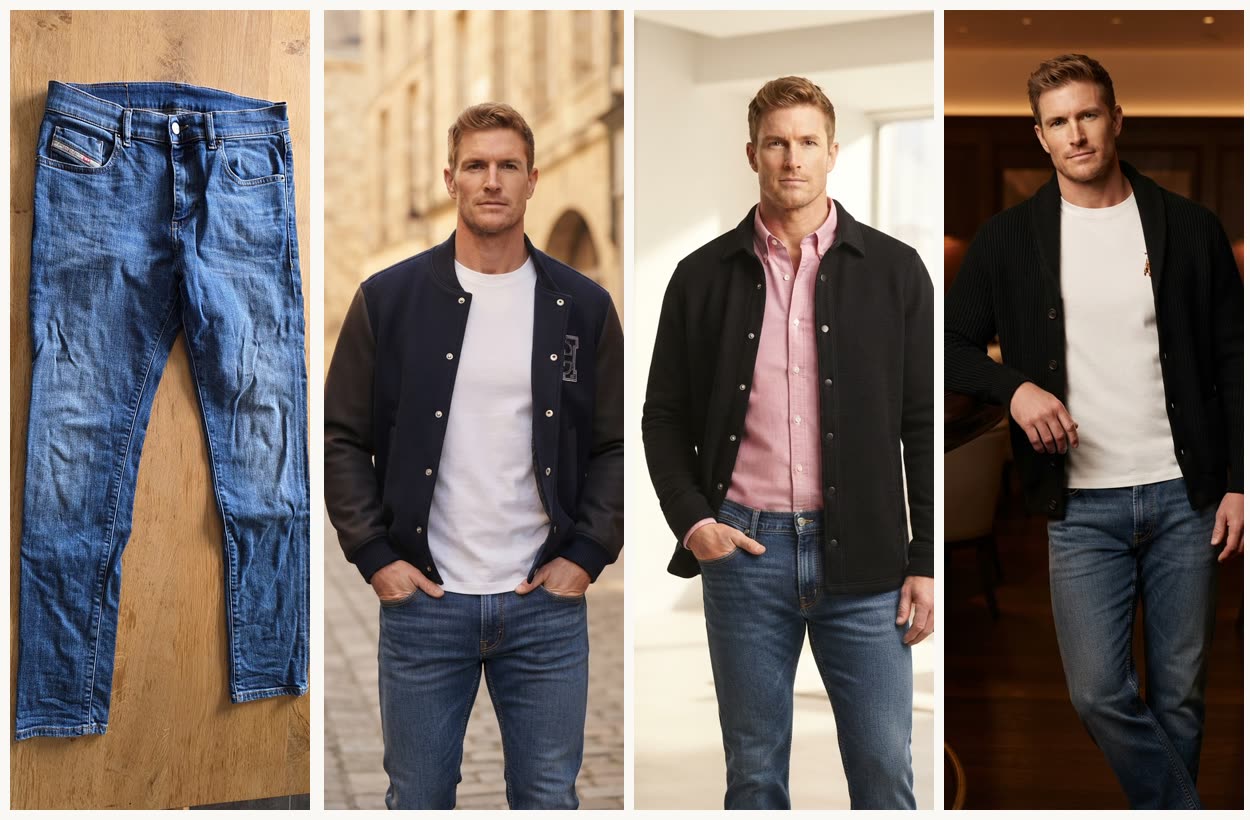
Build outfits from your real pieces
- Add your clothes with your phone camera. Up to 20 pieces on the free plan, unlimited on Premium.
- Choose a starting point: an occasion, the weather, or one piece you want to wear.
- The builder assembles complete outfits from your closet: top, bottom, layers and shoes if you added them.
- Compare the options side by side and preview the one you prefer on a model.
Why build instead of guess
Standing in front of the closet, you test combinations one at a time, in your head or in the mirror. The builder tests them all at once and shows you the best three, which is why it is so useful on busy mornings and before trips.
It also shows how far one piece can go. One pair of jeans with three jackets gives three different days: a relaxed Saturday, an office day, a dinner out.
Outfit formulas the builder starts from
Good outfits are rarely random. Most of them follow a handful of simple formulas, and the builder uses the same ones a stylist would, then fills them with your pieces.
- Third piece: a top and pants look finished once you add a layer, like a blazer, an overshirt or a cardigan.
- One statement: a printed shirt or a bright sweater, with everything else plain so it has room.
- Tonal: two or three shades of the same color, from top to shoes, for an easy, expensive look.
- Contrast of textures: denim with knit, leather with cotton, so a simple outfit does not look flat.
- Dress up, dress down: a smart piece with a casual one, like a blazer over a T shirt and jeans.
What ten pieces can build: real occasions
Office
Navy knit sweater over a white shirt, gray pants, brown loafers. Swap the sweater for a blazer when the meeting matters.
Date night
Black jeans, a silky shirt or a fine black knit, the leather jacket and ankle boots.
Brunch
Straight jeans, a striped top, the blazer worn open and clean white sneakers.
Fall weekend
Cream cable sweater, dark jeans, a chore jacket or a flannel overshirt, suede boots.
Wedding guest
A midi dress or a suit, with the shoes and layer the builder checks against the forecast for an outdoor ceremony.
Travel day
Soft pants, a knit, the layer you want on the plane and sneakers, all pieces that rewear on the trip.
Built for real closets
- Your photos, your pieces: no stock catalog.
- Weather aware, so the builder does not suggest a thin shirt on a cold day.
- Honest previews: real prints and colors, small logos never invented.
- Works on iPhone and Android in the browser, no app store needed.
Questions
Is the outfit builder free?
Yes. Building outfits is free with 3 suggestions a day and up to 20 pieces. Premium adds unlimited pieces and look previews. It costs $7.99 a month after a 7 day free trial you can cancel anytime.
What is the difference with a generic outfit builder website?
Generic builders let you drag catalog images onto a board. OutfitMaker builds outfits from photos of your own clothes and previews the result on a model.
How many pieces do I need?
You can start with a handful, but the builder gets much better from about ten pieces: two or three tops, two bottoms and a layer already give many combinations.
Can I build an outfit by hand?
Yes. The outfit designer canvas lets you drag your own pieces into a look, move them around and save it, if you prefer to build without suggestions.
Can I use it for a trip?
Yes. Plan outfits for the days and occasions of your trip and pack only what the outfits use.
Your closet already has the outfits.
Start free